The internet at Ancaster Branch is not working. We aim to have it fixed quickly.
Due to driver availability, Bookmobile is off the road for the following. We apologize for the inconvenience.
Wednesday, July 22:
- Helen Detwiler Cancelled
- Garth Cancelled
- St. Elizabeths Cancelled
- Gemini Cancelled
- Rosedale Cancelled
- Strathcona Cancelled
- McMaster - Cancelled
Thursday, July 23:
- Rockton Cancelled
- Mohawk Gardens Cancelled
- Meadowlands Cancelled
Wednesday, July 29:
-
Helen Detwiler Cancelled
As of July 1st, partner library Members can no longer borrow HPL Express items via Overdrive. More to Borrow partner libraries will be offering Lucky Express (Skip the line) titles to their cardholders only. This will help manage wait times for popular titles. Lucky Express is a collection of in demand titles with a seven-day loan period, available with no wait.
Our partners will still be able to borrow titles from the rest of our collection.
www.hpl.ca/more-to-borrow
The What's Happening Guide has been retired and replaced with different communications channels and tactics. You can find the new Summer Reading Flyer here. Watch for future communications updates.
Sunday hours return to Central Library. Beginning July 5, Central is open Noon to 5pm. Dundas, Red Hill, Terryberry, Turner Park, Valley Park and Waterdown branches are also open Sundays, 1 to 5pm. hpl.ca/hours
After Hours Study Hall is not available in July and August. Hours will resume Tuesday, September 8. www.hpl.ca/study-halls
Catalogue "My Shelves" Private Feature
HPL card holders have the option to make their My Shelves (For Later, Completed and In Progress) titles private.

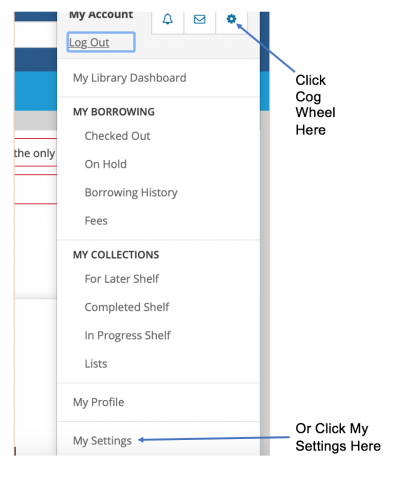
To do so, log in to your account. In the top right corner where your user name appears, choose the cog wheel (beside the envelope symbol) or scroll down to My Settings. (Figure 1)

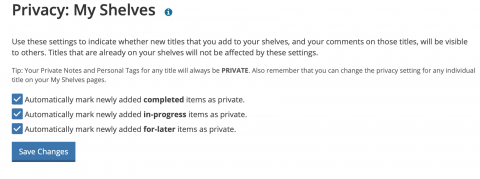
Then, scroll down to Privacy. Where it says My Shelves click on Change. Three boxes appear indicating which feature you would like to make private: For Later, Completed and In Progress. Click on the ones you would like to make private. Then click Save Changes. (Figure 2)
If you need assistance to update your settings, please call (905) 546-3200 or contact us via Online Chat.